




At Quick Connect, we love helping customers upgrade their systems — faster CPUs, better performance, smoother workflows. But every now and then, a DIY install comes in that reminds us just how delicate modern hardware really is.
Earlier this month, a customer attempted to install a new CPU on his own. When the system wouldn’t boot afterward, he brought the computer to our Lincoln location hoping we could save it.
What we found told the whole story.
Bent Pins: The Silent Motherboard Killer
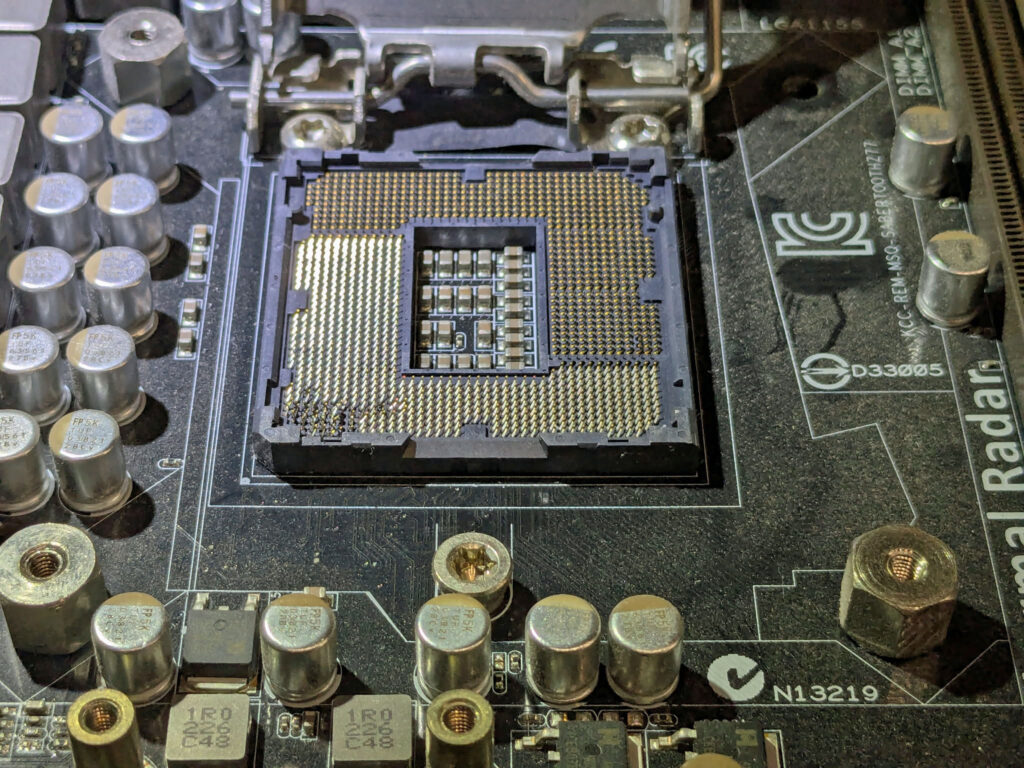
LGA sockets are incredibly precise. Hundreds of tiny gold pins sit in perfect alignment, each responsible for carrying power or data to the CPU. If even a few are bent, the system can fail to boot, crash under load, or permanently damage components.
In this case, several pins were visibly bent — enough to break critical connections.
We pulled out the microscope and tried to realign them. Our technicians have saved many boards this way. But sometimes the damage is simply too severe.
This one didn’t make it.
Why Professional Installation Matters
Installing a CPU looks simple: lift the latch, drop the chip in, close it up. But the tolerances are razor‑thin. A slight angle, a tiny slip, or pressure in the wrong spot can bend pins instantly — bent pins often mean the motherboard is damaged beyond repair.
Professional installation ensures:
- Correct CPU seating
- Proper socket alignment
- Zero pin damage
- Thermal paste applied correctly
- Full post‑install testing
A small fee for install can save a $300–$600 motherboard.
We’re Here to Help
If you’re upgrading your CPU, motherboard, or cooler, bring it to Quick Connect. We’ll install it cleanly, test it thoroughly, and make sure your system fires up the first time — without the heartbreak of bent pins.
DIY is great. Dead motherboards aren’t.